Description
📅 The Events Calendar Single Event Page Template
Edit & design a single event page template using the Event Single Page Builder add-on in combination with 🔗 The Events Calendar WordPress plugin, which has over 800,000+ active installations.
Using the event single page builder addon, you can showcase your single event page with beautiful design, and you can easily customize the colors in the event single template settings.
🔥 Single Event Page Demo
Why Design an Event Single Page?
- Match colors with your theme styles.
- Advanced settings to control layout of single page.
- Show event countdown timer on single event page.
- Show related events in an awesome layout.
- Fully responsive event page design.
- Finally you can upgrade a simple design provided by The Events Calendar plugin in a new elegant look.
🔥 Event Single Page Builder Pro
- You must upgrade to premium version of event single page builder plugin if you want more pre-designed templates and more advanced settings.
- Pro version also provides support for Elementor page builder, you can design event single page template in Elementor as you want, it also provides pre-build event page templates for Elementor that you can edit easily.
- 🔗 Buy Pro Version
➕ More Add-ons to Extend The Events Calendar
In addition to the Event Single Page Builder plugin, there are more addons available to extend the functionality of The Events Calendar plugin.
- 💪 Events Shortcodes Pro, an addon that work as The Events Calendar shortcode, you can show events list, grid, events carousel and slider on any page via shortcodes – 🔗 View Demos
- 💪 Events Widgets Pro, show events list, grid, carousel and more in Elementor pages easily using The Events Calendar Elementor Widgets – 🔗 View Demos
😎 Who’s Behind This Plugin
Event Single Page Builder plugin is not developed by or affiliated with “The Events Calendar” official plugin, which is a part of StellarWP, the software arm of Liquid Web. It is a third party addon that provides extra features to remove this free plugin limitations.
This plugin is managed by 🔗 Cool Plugins, a team of experienced WordPress plugin developers. They have 7+ years of WordPress plugin development experience and have released 20+ free and premium WordPress plugins. Their plugins have been downloaded over 1000k+ times, and 100K+ active websites are using their plugins.
✍ Special THANKS!
Special thanks to famous The Events Calendar plugin authors for creating an awesome plugin for events management.
Screenshots

Single Event Page Template 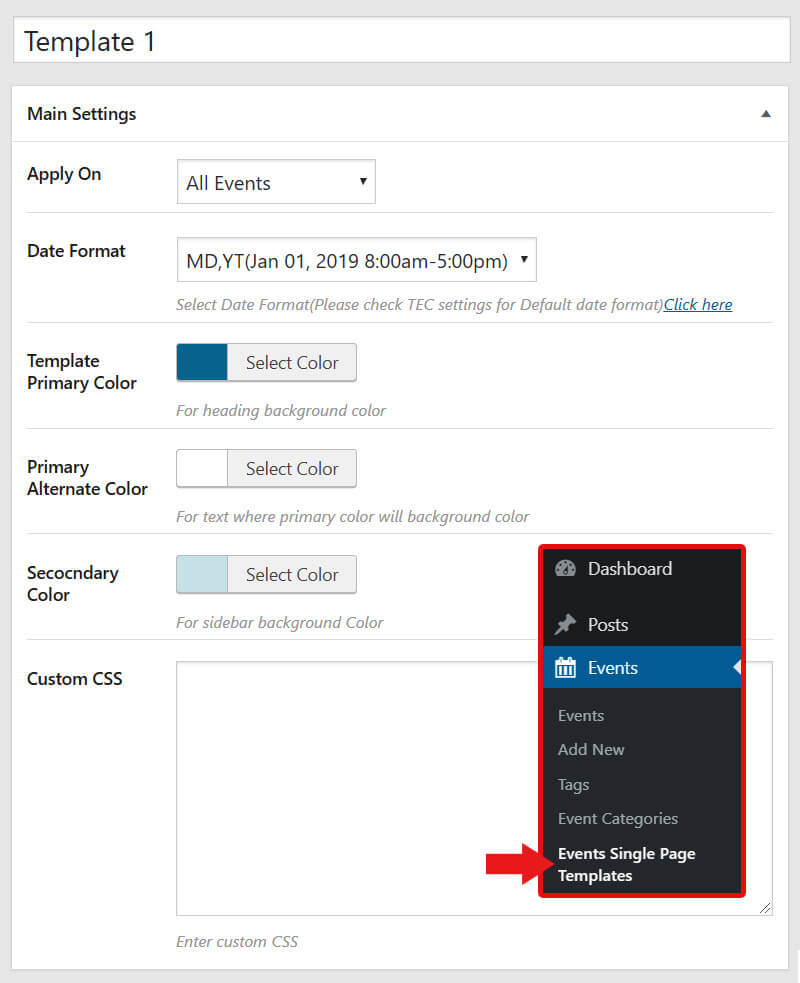
Event Page Template Settings 
Compare Layout - The Events Calendar (Default) vs This Addon
Installation
-
Search “event single page” inside your website wp-admin dashboard >> Plugins >> Add New and install Event Single Page Builder plugin. You can also install plugin by uploading a plugin-zip unzipped folder to the /wp-content/plugins directory. You must install The Event Calendar free plugin if you want to use this plugin features.
-
Activate the plugin through Plugins >> Installed Plugin menu inside your wp-admin dashboard.
-
You can edit the single event template colors and other settings from Events Addons >> Single Event Template.
FAQ
-
How it works?
-
This plugin works as an add-on for The Events Calenar plugin. First you need to install and activate free version of “The Events Calendar” then install this addon and design event single page for the events created via The Events Calendar plugin.
-
How to show events in list or grid layout?
-
This addon will only design single event pages, if you want to show your all events in list, grid or events carousel layout on any page then you can try our other addons.
- 📅 Events Shortcodes For The Events Calendar, Use shortcodes to show events list, grid, carousel on any page.
- 📅 Events Widgets For Elementor & The Events Calendar, Show events list, grid in elementor pages easily.
-
Can I select any date format on single event page?
-
Yes, from template settings you can select any date format that you want to show on single event page.
-
Can I design single tempalte using Gutenberg block editor?
-
No, This addon only provides a pre-designed template and you can adjust colors and settings inside it.
Reviews


Contributors & Developers
“Event Single Page Builder For The Event Calendar” is open source software. The following people have contributed to this plugin.
Contributors


“Event Single Page Builder For The Event Calendar” has been translated into 2 locales. Thank you to the translators for their contributions.
Translate “Event Single Page Builder For The Event Calendar” into your language.
Interested in development?
Browse the code, check out the SVN repository, or subscribe to the development log by RSS.
Changelog
Version 1.7.1 || 18 April 2024
- Fixed: Related Events showing again when TEC Pro is activated.
- Tested upto WordPress 6.5.2
- Tested upto The Event Calendar 6.3.6
Version 1.7.0 || 18 January 2024
- Fixed: Minor issues.
- Tested upto WordPress 6.4.2
- Tested upto The Event Calendar 6.2.9
Version 1.6.9 | 01 December 2023
- Tested upto Elementor 3.17.3
- Tested upto WordPress 6.4.1
- Tested upto The Event Calendar 6.2.8.1
Version 1.6.8 | 22 September 2023
- Fixed: Undefined array key 1 issue at admin side
- Tested upto Elementor 3.16.4
- Tested upto WordPress 6.3.1
- Tested upto The Event Calendar 6.2.2
Version 1.6.7 | 07 August 2023
- Minor Update.
- Tested upto Elementor 3.15.1
- Tested upto WordPress 6.3
- Tested upto The Event Calendar 6.1.3
Version 1.6.6 | Mar 29, 2023
- Improved: Minor textual changes.
- Improved: Updated links.
- Improved: Dashboard Code.
- Improved: Feedback Form.
- Updated: Readme.
Version 1.6.5 | 01 Nov 2022
- Fixed: share email button link issue.
- Fixed: Custom CSS code editor issue.
- Fixed: Related events issue with The Events Calendar 6.0.2
Version 1.6.4 | 12 Oct 2022
- Fixed: Minor bug fixes.
Version 1.6.3 | 27 Apr 2022
- Fixed: Images bug.
- Fixed: Date format issue.
Version 1.6.2 | 14 Apr 2022
- Fixed: Minor bug.
Version 1.6 | 07 Apr 2022
- Fixed: Minor bug.
Version 1.5 | 23 Oct 2020
- Added: Integrated Events Addon Section
- Updated: Managed settings under events addon menu.
Version 1.4.2 | 12 Mar 2020
- Fixed: Html rendering.
- Fixed: Fixed deactivation form bug.
- Updated: Tested up 5.4
- Improvements: Improved overall code.
Version 1.4.1 | 22 Nov 2019
- Fixed: Sanitized title and released event title.
- Fixed: Minor code improvements.
Version 1.4 | 19 Nov 2019
- Added: Registration button.
- Added: Display comments.
- Fixed: Improved code security.
Version 1.3 | 10 Aug 2019
- Added: Option to add custom link to “View All” events.
- Added: Feedback on plugin deactivation.
- Fixed: Wrong RSVP view link.
- Fixed: Multi day support in all date formats.
- Improved: Code improvements.
Version 1.2.1 | 04 Jun 2019
- Fixed: Events content formatting issues.
Version 1.2 | 02 Jun 2019
- New: Released stable version.
Version 1.1 | 30 May 2019
- Updated: Integrated CMB2 Version 2.6
Version 1.0 | 29 May 2019
- New: Plugin released.